–  BOOTCAMP PRE-CONFERENCE TRAINING

GP DEXTERITY

PRODUCT FUNDAMENTALS

5-DAY BOOTCAMP | OCTOBER 5-9, 2026

📅

October 5–9, 2026

Mon–Fri, 8:00 AM – 5:00 PM

📍

Nashville, Tennessee

Gaylord Opryland Resort

💰

$3,000 per Attendee

Lunch provided daily

📅

DATES

Oct 5–9, 2026

📍

LOCATION

Gaylord Opryland
Nashville, Tennessee

DURATION

5 Full Days
8 AM – 5 PM

💰

INVESTMENT

$3,000 per Attendee

ABOUT THIS COURSE

MASTER THE DEXTERITY DEVELOPMENT
ENVIRONMENT

This intensive 5-day bootcamp teaches the development environment used to build
the Microsoft Dynamics GP family of products. Gain the foundation needed to build
integrated, database-independent applications and powerful application
functionality for Dynamics GP.

Designed for customers or partners who will be customizing or building add-on or
standalone applications to integrate with Dynamics GP products. It is also ideal
for developers working with other development tools who want to understand the
internal workings of Dynamics GP.

Led by industry legend David Musgrave — MVP, GPUG All Star, and Summit Legend who
has been developing with Dexterity since 1994 — this course delivers decades of
expertise in an immersive, hands-on format.

SECURE YOUR SEAT

Seats are limited — register early

📅

COURSE DATES

October 5–9, 2026
Monday – Friday

⏰

DAILY SCHEDULE

8:00 AM – 5:00 PM

📍

VENUE

Gaylord Opryland Resort
Nashville, Tennessee

🍽️

MEALS

Lunch provided daily

💰

TUITION

$3,000
REGISTER NOW
WHAT YOU WILL LEARN

CURRICULUM & TOPICS COVERED

Over five intensive days you will gain hands-on experience with every facet of the Dexterity development environment.

01

Dexterity Components & Dev Environment

Navigate and configure the complete Dexterity development environment used to build Dynamics GP.

02

Data Entry Projects

Build basic forms and windows; understand the fundamentals of GP's data entry architecture.

03

Scripting & Debugging

Write and debug Dexterity scripts; apply programming techniques foundational to GP development.

04

Lookup & Transaction Projects

Develop lookup windows and full transaction entry forms that integrate natively with GP.

05

Form & Report Modification

Modify existing Dynamics GP windows and reports to meet client requirements.

06

Developing Add-On Applications

Build add-on applications that interact with Dynamics GP products and leverage its internal architecture.

07

Packaging & Product Registration

Package and ship your dictionary with a unique Product ID registered with Microsoft Dynamics GP.

08

Object Triggers, Utilities & Report Writer

Implement object triggers, integrate with Utilities, and develop Report Writer applications.

LEARNING OBJECTIVES

WHAT YOU'LL BE ABLE TO DO

Understand the Dexterity development environment used to build Microsoft Dynamics GP

Build integrated, database-independent applications for Dynamics GP

Develop applications with powerful GP application functionality

Modify existing Dynamics GP forms and reports to meet business needs

Develop add-on applications that interact with Dynamics GP products

Package and ship a dictionary with a unique Product ID

Create applications that look, feel, and integrate like native Dynamics GP

Implement object triggers within your GP customizations

WHO SHOULD ATTEND

THIS BOOTCAMP IS BUILT FOR YOU IF...

  • You are a customer or partner customizing Microsoft Dynamics GP
  • You are building add-on or standalone applications to integrate with
    Dynamics GP
  • You are a developer working with other tools who wants to understand GP’s
    internal workings
  • You need to create, maintain, or support your own GP customizations

No Development Background Required

Prior development experience is helpful but not required for this Fundamentals course. David's teaching approach has guided developers of all backgrounds through Dexterity since 1994.

Pre-Conference Timing

This bootcamp runs the week immediately before Community Summit North America 2026 (Oct 11–15), allowing you to get the most out of both experiences in a single trip to Nashville.

5-DAY SCHEDULE

COURSE AGENDA

Each day runs from 8:00 AM to 5:00 PM with lunch provided. Sessions build progressively from fundamentals to advanced application development.

Day 1 — Monday, October 5 · Introduction & Environment Setup

  • Overview of the Dexterity development environment
  • Understanding Dexterity components and architecture
  • Setting up your development environment
  • Basic programming concepts in Dexterity
  • Navigating the Dynamics GP dictionary structure
  • Hands-on lab: Your first Dexterity project

Day 2 — Tuesday, October 6 · Data Entry & Forms

  • Building data entry projects from scratch
  • Creating and configuring basic windows
  • Form design principles that mirror native G
  • Field definitions, data types, and validation
  • Introduction to Dexterity scripting
  • Hands-on lab: Data entry project build

Day 3 — Wednesday, October 7 · Scripting, Debugging & Lookups

  • Advanced Dexterity scripting techniques
  • Debugging tools and troubleshooting strategies
  • Developing lookup windows
  • Transaction project development
  • Modifying existing GP forms and windows
  • Hands-on lab: Lookup & transaction forms

Day 4 — Thursday, October 8 · Add-Ons, Triggers & Integration

  • Developing add-on applications for Dynamics GP
  • Implementing object triggers
  • Utilities and Dynamics GP integration
  • Report Writer application development
  • Form and report modification deep-dive
  • Hands-on lab: Add-on application build

Day 5 — Friday, October 9 · Packaging, Deployment & Certification

  • Packaging your Dexterity dictionary
  • Registering your product with Microsoft Dynamics GP
  • Assigning and managing unique Product IDs
  • Shipping and distributing your customization
  • Course review and Q&A with David Musgrave
  • Hands-on lab: Complete end-to-end deployment
BEFORE YOU ARRIVE

PREREQUISITES

📚

KNOWLEDGE PREREQUISITES

  • Understanding of Microsoft Dynamics GP navigation and administration (required)
  • Understanding of general development concepts (helpful, not required)
💻

COMPUTER REQUIREMENTS

  • Laptop with SQL Server installed and running locally
  • Microsoft Dynamics GP (preferably latest version) locally installed
  • Only the sample company is needed — no production data required
🔑

ACCESS & CREDENTIALS

  • Know your laptop's administrator password
  • Know your SQL Server 'sa' password
  • Know your GP system password (if configured)
  • A second monitor is strongly recommended
IMPORTANT INFORMATION

SPECIAL INSTRUCTIONS

01

Conference Discount Code

When registering for the Community Summit North America 2026 main conference, use discount code WinthropDev15 for 15% off your conference registration fee.

02

Prepare Your Equipment

Ensure your laptop has SQL Server and Dynamics GP installed and working prior to arriving. Only the sample company is required. Bring your administrator, SQL SA, and GP system passwords. A second monitor is strongly recommended.

03

Plan Your Travel for Both Events

The bootcamp (Oct 5-9) immediately precedes Community Summit North America 2026 (Oct 11-15) at the Gaylord Opryland Resort in Nashville — maximize your investment with one trip covering both.

YOUR INSTRUCTOR

MEET THE EXPERT

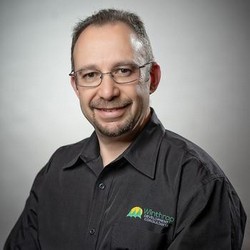
David Musgrave

DAVID MUSGRAVE

MVP • GPUG ALL STAR • SUMMIT LEGEND

David has been developing with Dexterity since 1994 — longer than many GP users have been in the workforce. As a Microsoft MVP, GPUG All Star, and Summit Legend, he brings unmatched depth of knowledge to this training. His hands-on, practical approach ensures attendees leave with real-world skills they can apply immediately to their GP customizations.

READY TO MASTER
GP DEXTERITY?

Join this exclusive 5-day bootcamp before Community Summit NA 2026. Seats are strictly limited — don’t miss what may be the final offering of this legendary training.

REGISTER NOW
Latest Posts
Ads
Categories
  • No categories